

💡 Where is Edudel?
A comprehensive guide to the Edudel portal (edudel.nic.in), covering result checking for Class 9 and 11, EWS admissions, and official circulars for Delhi students.
Understanding Edudel: The Complete Guide to Delhi Directorate of Education Online Services
The digital transformation of the education sector in India has seen significant milestones, particularly within the National Capital Territory of Delhi. At the heart of this transformation is Edudel, the official web portal of the Directorate of Education (DoE), Government of NCT of Delhi. This platform serves as a centralized hub for students, parents, and educators, streamlining administrative processes and providing easy access to academic resources. In an era where digital literacy is paramount, understanding how to navigate edudel.nic.in is essential for anyone involved in the Delhi school system.
What is the Edudel portal?
Edudel is the primary digital gateway managed by the Directorate of Education in Delhi. It is designed to host a wide array of services ranging from student admissions and examination results to teacher recruitment and school management systems. According to regional education analysts, the implementation of this portal has significantly reduced the bureaucratic hurdles that parents and students previously faced. By digitizing records and communication, the DoE ensures transparency and efficiency in the public and private aided school sectors of Delhi.
The portal is not merely a notice board but an interactive ecosystem. It houses the Management Information System (MIS), which allows schools to update real-time data regarding student attendance, infrastructure, and faculty details. For a student, it is the place to find the latest syllabus, sample papers, and most importantly, the annual and mid-term examination results.
How to check Delhi school results on Edudel?
One of the most frequent uses of the Edudel website is for checking academic results, particularly for non-board classes such as Class 9 and Class 11. As per the administrative framework of the Delhi Government, the process is designed to be user-friendly to ensure that parents from all backgrounds can access their child’s performance reports without assistance.
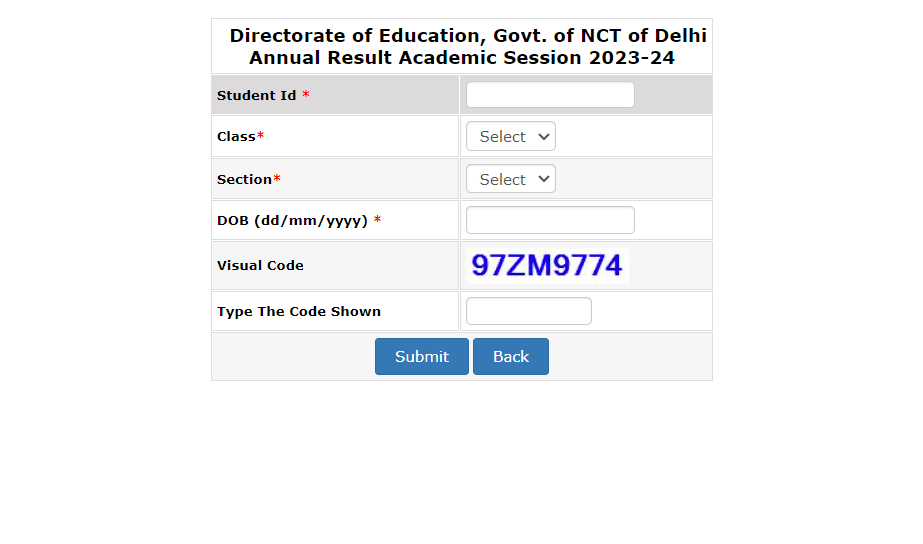
To access the results, a user must follow these standardized steps:
- Visit the official website at edudel.nic.in.
- Navigate to the section labeled Results or Exam/Academic Module.
- Select the specific link for the annual or mid-term results corresponding to the relevant academic cycle.
- Enter the required credentials, which typically include the Student ID, Class, Section, and Date of Birth.
- Verify the Captcha code if prompted and click on the submit button.
- The marksheet will be displayed on the screen, which can then be downloaded or printed for future reference.
Many students face problems during result time because they forget their Student ID. To avoid this issue, you should save your Student ID in your phone or keep a photo of your school ID card.
This simple step can save a lot of time and stress when results are announced. This ID is a permanent number assigned to every student enrolled in a Delhi government school.
I have seen that many students and parents get confused while using the Edudel website, especially during result time or admission process.
Sometimes the website becomes slow, or users enter wrong details which leads to errors.
In this guide, I will explain everything in a simple way so you can avoid these common mistakes.

What are the key features of the Edudel portal?
Beyond results,The Edudel portal is not just for checking results. It provides many useful services for students, parents, and teachers. Here are some important features that you can use According to industry reports on digital governance, the following modules are the most utilized:
1. EWS and DG Category Admissions
The portal manages the admission process for the Economically Weaker Section (EWS) and Disadvantaged Groups (DG) in private unaided recognized schools. This automated lottery system ensures a fair and transparent allocation of seats as mandated by the Right to Education Act. Parents can fill out application forms, track their status, and view the allotment lists directly on the site.
2. Public Circulars and Notifications
The circulars section is perhaps the most critical for school administrators and teachers. It contains official orders regarding school holidays, changes in the academic calendar, recruitment notices, and policy updates. As per recent industry reports, this section serves as the legal point of reference for all government-aided schools in the region.
3. Academic and Examination Resources
Edudel provides a dedicated section for academic support. This includes downloadable textbooks, previous year question papers, and marking schemes. These resources are invaluable for students preparing for competitive environments, providing them with the same materials used by teachers to set school-level examinations.
4. Teacher and School Support
The portal includes links for teacher training, guest teacher recruitment, and the MIS login for school principals. This backend support ensures that the human resource management of the education department remains organized and data-driven.
How to apply for EWS admissions via Edudel?
The EWS/DG admission process is a major annual event on the Edudel portal. To apply, parents must wait for the notification usually released at the beginning of the academic year. The process involves registering with a valid mobile number, filling in the child’s details, and selecting preferred schools within a specific radius of their residence. Experts suggest that parents should double-check the income certificate and category certificate details, as any discrepancy can lead to the cancellation of the allotted seat during the physical verification stage at the school.
Why is the Edudel portal important for Delhi schools?
The importance of Edudel lies in its ability to centralize a massive educational network. Delhi’s Directorate of Education oversees thousands of schools and millions of students. Without a centralized digital platform, the dissemination of information would be slow and prone to errors. Edudel ensures that a circular issued at the headquarters reaches a school in a remote part of the city instantly. Furthermore, it empowers parents by giving them direct access to their child’s academic records and the ability to hold the system accountable through transparent admission and result processes.
Common mistakes to avoid when using edudel.nic.in
While the portal is robust, users often encounter issues due to simple errors. Here are the most common mistakes identified by educational consultants:
- Incorrect Student ID: Many parents confuse the Student ID with the Aadhaar number or the Roll Number. The Student ID is a specific 10-digit or 11-digit number provided by the school.
- Date of Birth Format: The website usually requires the date of birth in a specific format (DD/MM/YYYY). Entering it incorrectly will lead to an Invalid Credentials error.
- Ignoring Browser Compatibility: Some modules of the Edudel portal, especially the MIS login, work best on desktop browsers like Google Chrome or Mozilla Firefox rather than mobile browsers.
- Missing Deadlines: Whether it is for EWS admissions or scholarship applications, missing the deadline on the portal usually means the link will be deactivated, with very few chances for late submission.
Expert tips for navigating the Delhi DoE website
To make the most of the Edudel portal, experts recommend the following pro tips:
- Check the Archive: If you are looking for an old circular or result, use the archive section. The main page only displays the most recent updates.
- Use the Search Function: Instead of scrolling through hundreds of circulars, use the search bar with specific keywords like admission or holiday to find information faster.
- Verify URL: Always ensure you are on edudel.nic.in. During result seasons, many phishing sites mimic the official look to steal user data or show advertisements.
- Clear Cache: If the website feels slow or the result page is not loading, clearing your browser cache or using an incognito window often resolves the issue.
Common Problems Students Face on Edudel
While using the Edudel portal, many users face common issues. Here are some real problems and their solutions:
1. Website Not Opening
During result time, the website may become slow due to heavy traffic. Try opening it early morning or late night.
2. Invalid Details Error
This happens when Student ID or Date of Birth is entered incorrectly. Always check format (DD/MM/YYYY).
3. Result Not Showing
Sometimes results are uploaded in parts. Wait for some time and check again later.
4. Forgot Student ID
You can find your Student ID on your school ID card or ask your school teacher.
Frequently Asked Questions (FAQ)
Is Edudel website official?
Yes, edudel.nic.in is the official website of Delhi Directorate of Education.
Can I check result without Student ID?
No, Student ID is required to check results.
Why is Edudel website slow?
Due to heavy traffic during result announcements.
How to recover Student ID?
Conclusion
The Edudel portal is very helpful for Delhi students, but many users still face confusion while using it.
If you follow the steps and tips mentioned in this guide, you can easily check your results and complete admission processes without any issues.Make sure to always use the official website and keep your details ready before checking results.If you found this article helpful, you can explore more useful guides on our website.
Related Media
Quick View: Understanding Edudel: The Complete Guide to Delhi Directorate of Education Online Services





Comments 0
Leave a Reply
Your email address will not be published. Required fields are marked *
Be the first to share your thoughts!